
What's the difference between a work order and a purchase order? Plain-English breakdown with comparison table, use cases, and free downloadable templates for both.
What Is a Work Order?
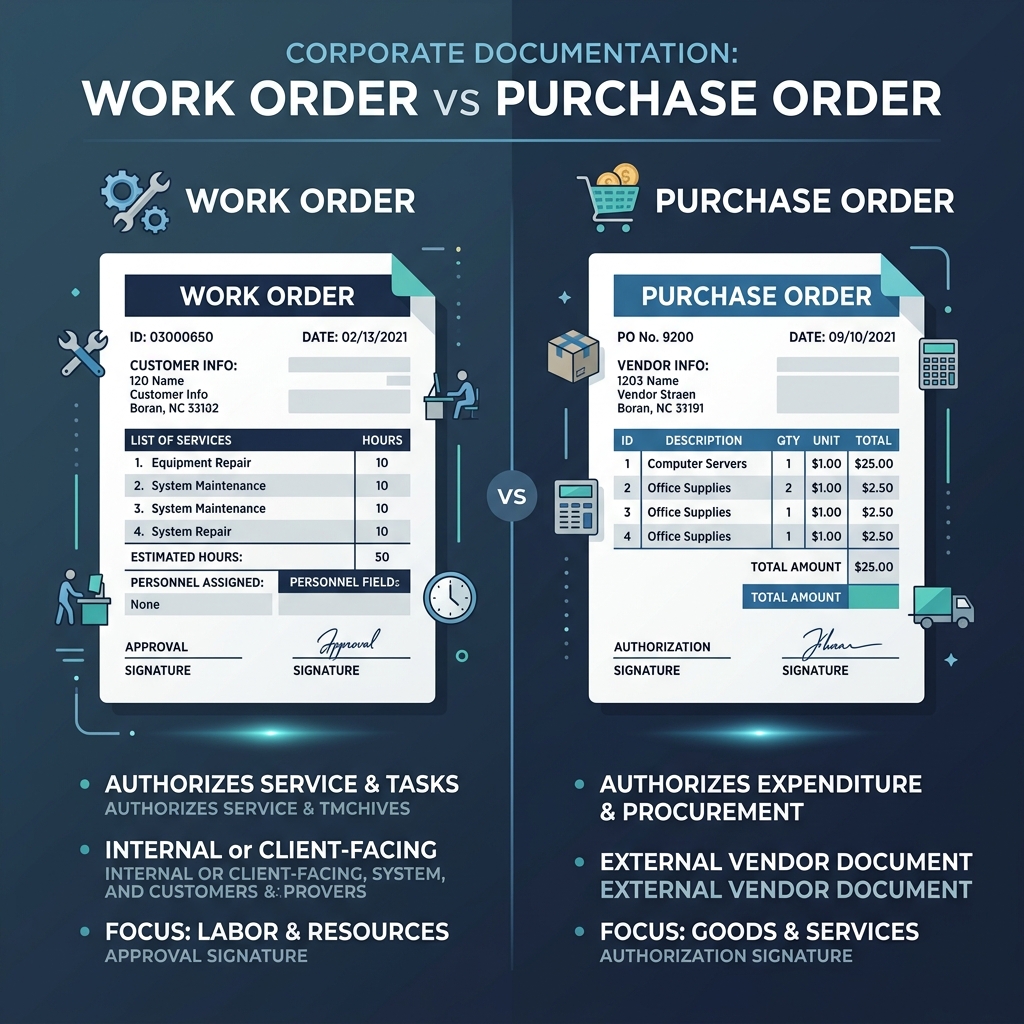
A work order (WO) is an internal or external document that authorizes and describes the work to be performed. It includes the specific task, who is responsible for it, the expected completion time, and any required materials or equipment. Work orders are used extensively in maintenance, field service, manufacturing, and construction.
The key distinction: a work order describes what work needs to be done. A purchase order describes what needs to be bought.
What Is a Purchase Order?
A purchase order (PO) is a commercial document from a buyer to a supplier that formally authorizes the purchase of specified goods or services at an agreed price. Once the supplier accepts it, it creates a legally binding agreement.
Where a work order focuses on internal task assignment and service delivery, a purchase order focuses on the procurement transaction between a buyer and an external supplier.
Work Order vs Purchase Order — Comparison Table
| Feature | Work Order (WO) | Purchase Order (PO) |
|---|---|---|
| Primary purpose | Authorize and track work to be done | Authorize purchase of goods/services |
| Who uses it | Operations, maintenance, field service, project managers | Procurement, finance, purchasing teams |
| Issued by | Internal manager or supervisor | Buyer (issued to external supplier) |
| Issued to | Internal technician, contractor, or service crew | Supplier or vendor |
| Typical content | Task description, location, required materials, assigned worker, due date | Item description, quantity, price, delivery terms, payment terms |
| Legally binding? | Not typically (internal document) | Yes, once accepted by supplier |
| Can trigger an invoice? | Yes — contractor invoices against the work order | Yes — supplier invoices against the PO number |
Which One Should You Use?
Use a work order when:
- You are assigning a task internally to a team member or technician
- You are hiring a contractor to perform a specific service (repair, installation, inspection)
- You need to track maintenance tasks and completion {{ ... }}
- You are in field services, facilities management, or construction
Use a purchase order when:
- You are buying goods or services from an external supplier
- You need a formal procurement record for audit, compliance, or budget control
- You are buying on credit terms (the PO is the authorization to spend)
- Multiple people need to approve the purchase before it happens
In some scenarios, you need both: a PO authorizes the purchase of materials, and a work order assigns the task of installing them.
What Goes in a Work Order — 10 Fields
- Work Order Number (unique, sequential)
- Date issued
- Priority level (standard, urgent, emergency)
- Job description (specific task to be completed)
- Location (address or asset ID)
- Assigned to (worker name or contractor company)
- Required start and completion date
- Materials required (list with quantities)
- Labour time estimated
- Authorization signature
Work Order Example
Work Order #WO-2026-0847
Date: 18 September 2026
Priority: Urgent
Task: Replace faulty HVAC unit in Server Room B
Location: 3rd Floor, North Wing — Room 312
Assigned to: TechCool HVAC Services
Due: 19 September 2026 by 16:00
Materials: 1× Daikin FTX50K (stock item #HV-0023), 5m copper pipe, 2× refrigerant valves
Estimated labour: 6 hours
Authorized by: Facilities Manager — [signature]
Frequently Asked Questions
Can a work order be used as a legal contract with a contractor?
A signed work order can function as a simple contract with a contractor, particularly for small, well-defined jobs. For larger or more complex work, supplement it with a formal service agreement.
Does a work order replace an invoice?
No. A work order authorizes the work; an invoice requests payment after the work is done. The contractor references the work order number on their invoice.
What is the difference between a work order and a job ticket?
They are the same thing under different names. "Work order" is standard in facilities and field services; "job ticket" is common in printing, manufacturing, and repair shops.
Can I combine a work order and invoice into one document?
Yes — a work order invoice is a single document that describes the work and requests payment. Common for contractors and tradespeople billing for smaller, one-off jobs. Templix AI has a free work order invoice template for this purpose.
What numbering system should I use for work orders?
Sequential with a prefix: WO-2026-001, WO-2026-002. Use a date prefix (WO-20260918-001) if volume is high and date-based tracking is useful. Never reuse numbers — each work order needs a unique identifier for traceability.
For more ready-to-use layouts, check out our collection of free document templates to speed up your paperwork.
2026 Invoice Compliance & Fast Settlement Checklist
Verify these core line items before dispatching your billing documentation:
Sequential & Distinct ID
Maintain structured, unbroken numbering (e.g. INV-2026-001) for clean tax audits.
Direct Payment Rails & Pay Now Button
Embed Stripe, ACH, or instant wire links directly on the PDF for 1-click settlement.
Itemized Tax & SAC/HSN Codes
Clearly isolate gross subtotal from applicable GST/VAT percentages and line deductions.
Explicit Due Dates & Late Terms
State exact calendar deadlines and recurring late-interest policies upfront.


Reviewed by Finance & Document Structuring Specialists
Ready to put this into practice?
Browse Templix AI's free professional templates. Customize online, edit with AI, and download as PDF or Word — in minutes.


